
Montgomery County Traffic Court Records
Traffic court geography matters in Montgomery County. A Dayton citation begins with Dayton Municipal Court. A citation from Kettering, Centerville, Moraine, or Washington Township belongs in Kettering Municipal Court. Huber Heights and Riverside traffic matters use Montgomery County Municipal Court Eastern Division, while Trotwood, Brookville, Clay, Jackson, Jefferson, and Perry Townships and the named Western territory use Western Division. The citation itself is the first reliable clue to the court record.
County Municipal Eastern and Western cases are covered by the Montgomery County Clerk of Courts PRO system. Dayton and Kettering use separate court routes. A traffic case can later relate to another court record if it becomes a felony matter, but the citation and its initial docket remain with the issuing municipal or county court.
Which Montgomery Traffic Court Holds a Ticket
Use location and court name before selecting a search tool. County Municipal's Eastern Division serves Huber Heights and Riverside; the Western Division is based in Trotwood and serves its statutory west-side territory. Those cases use the Clerk's county PRO route. Dayton's Clerk hub separates Traffic & Criminal, Parking, Photo Enforcement, and Docket functions. Kettering's Court Connect is the public-record route for Kettering and its shared Centerville territory, but it has a CAPTCHA and acceptance gate before search.
That split also prevents a common error: the County PRO East and West filters are not generic filters for all cities in Montgomery County. A Centerville ticket, for example, should start with Kettering Municipal Court, not a County Municipal division. Confirm the court printed on the citation when an online search returns nothing.
Looking Up a Traffic Ticket
For County Municipal Eastern or Western traffic cases, use Clerk PRO free of charge. Start with Ticket Number or Case Number. If neither is available, PRO permits a party-name search and Case Type narrowing. Choose TRAFFIC EASTERN DIVISION or TRAFFIC WESTERN DIVISION for ordinary traffic matters, and choose the matching O.V.I. or parking category only when it fits the citation. The wrong East/West filter is a documented local reason a valid case may look absent.
- Read the citation for the court name, ticket number, appearance instructions, and date. The citation controls the venue and deadline.
- For a County Municipal East or West case, search PRO by Ticket Number or Case Number first. If necessary, use the name route and narrow by the correct traffic division and dates.
- For a Dayton case, use the Dayton Clerk's Traffic & Criminal search with its Case Number, Filing Date, Ticket Number, Defendant, or Attorney route. Dayton says a traffic ticket normally enters its system within five business days.
- For Kettering or Centerville territory, use Kettering Court Connect. If its CAPTCHA gate or a result prevents confirmation, call the Kettering Clerk or court instead of guessing at unobserved search fields.
- When a County Municipal record has not posted or a document is missing, contact or visit the proper Eastern or Western clerk counter. A records request can be made in person, by telephone, fax, or mail at the relevant division.
- Read the most recent docket entry, note the court date and any response instruction, then confirm a setting with the court if it is unclear or has changed.
PRO Ticket Numbers and East-West Traffic Filters
PRO's General Search fields include Case Number, Last Name, First Name, Company Name, Ticket Number, Case Type, Action Type, and a date range. All visible fields are marked unspecified rather than required. Its results stop at the first 1,000 records, so a broad name search should be narrowed rather than treated as an exhaustive answer. County Municipal case type labels include TRAFFIC EASTERN DIVISION, TRAFFIC WESTERN DIVISION, O.V.I. EASTERN DIVISION, O.V.I. WESTERN DIVISION, and parking-violation East and West categories.
The public docket is a record lookup, not a payment confirmation. Once a case is open, County Municipal notification tools can send email or text alerts, but the docket, citation, and direct court confirmation control a current date or obligation.
Use the Clerk's Municipal traffic information for its official traffic fee and court-cost context.
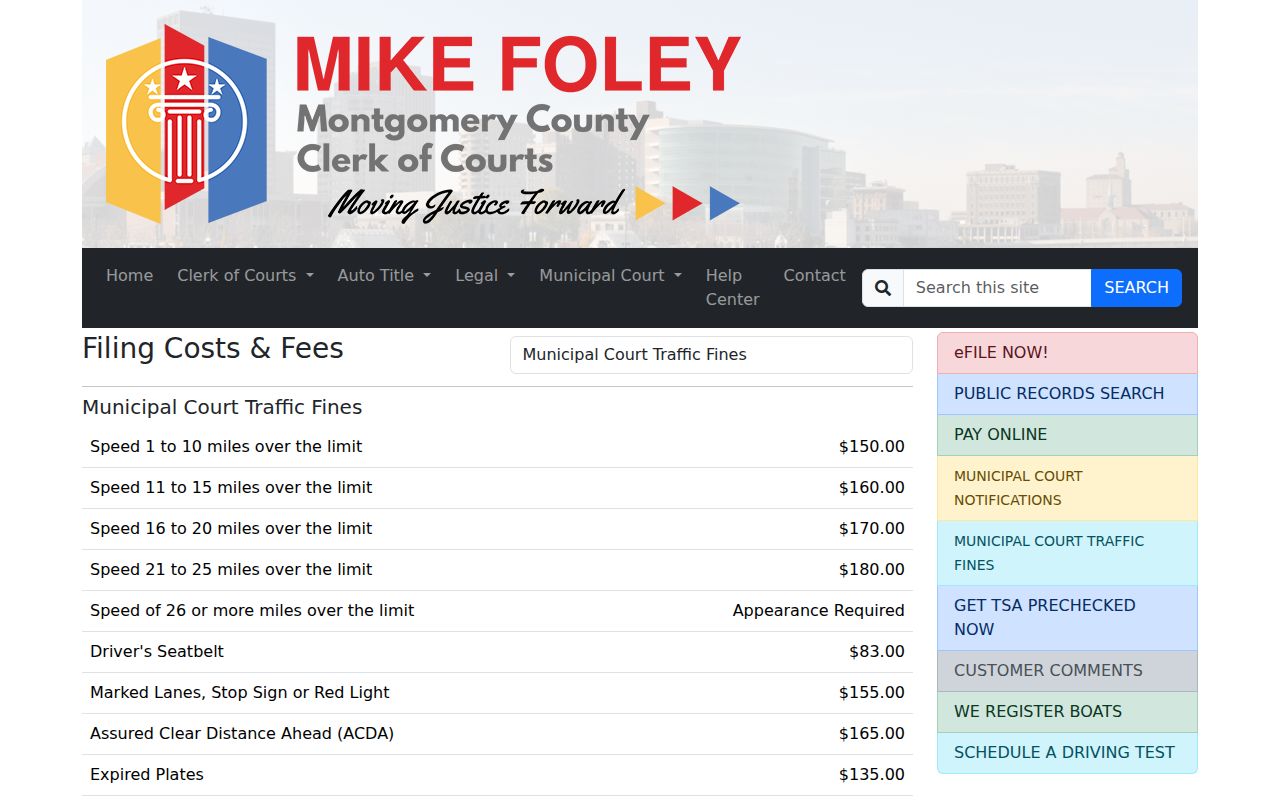
The Clerk material complements a ticket lookup by identifying the court's traffic-record context, rather than substituting a generic countywide ticket route.
How to Find Your Traffic Court Date
The appearance date printed on a citation is the starting point, but the current court date should be read from the latest docket entry and confirmed through the responsible court if the record shows a continuance, reset, or conflicting instruction. A standing schedule or payment balance does not prove a personal setting. For County Municipal cases, PRO identifies the case; the division clerk or local schedule helps confirm a current appearance.
| Citation or Case Number | Use the number printed on the ticket when possible. Dayton examples include 17TR15 for a case and 180519 for a ticket; County Municipal examples use traffic coding such as 2026 TRD 00001 W. |
|---|---|
| Court | The court named on the citation: Dayton, Kettering, County Municipal Eastern, County Municipal Western, or another appropriate municipal court. |
| Date & Time | The appearance, arraignment, trial, or other setting. Read later docket entries for a continuance or reset. |
| Courtroom or Session | Dayton's docket report can use courtroom, court date, session time, and sort order; other courts use their own schedule or clerk process. |
| Status | Read the docket entry or court result for the recorded status. A portal balance or old notice is not a complete status determination. |
County Bill Pay Is Not the Traffic Docket
The County Municipal Clerk Online Bill Pay portal is for an eligible payment, not a complete docket system. It offers Case, Name, Organization, and Ticket modes. Case mode requires a case number; Name requires first and last names of at least two characters; Organization requires an organization name of at least two characters; Ticket requires a ticket number of at least two characters.
| Bill-pay mode | Required input or limit |
|---|---|
| Case | Case Number required |
| Name | First Name and Last Name required; at least two characters each |
| Organization | Organization Name required; at least two characters |
| Ticket | Ticket Number required; at least two characters |
Results can display case information and an amount owed. The payment choices are Pay Current Balance or Make Partial Payment; a partial payment must be at least $1 and cannot exceed the total owed. Completed payments can take up to three days to appear, and some cases cannot be paid online. Use mail, the counter, or clerk/court contact where the portal says online payment is unavailable.
For the official payment screen and its stated limits, use Clerk Online Bill Pay.
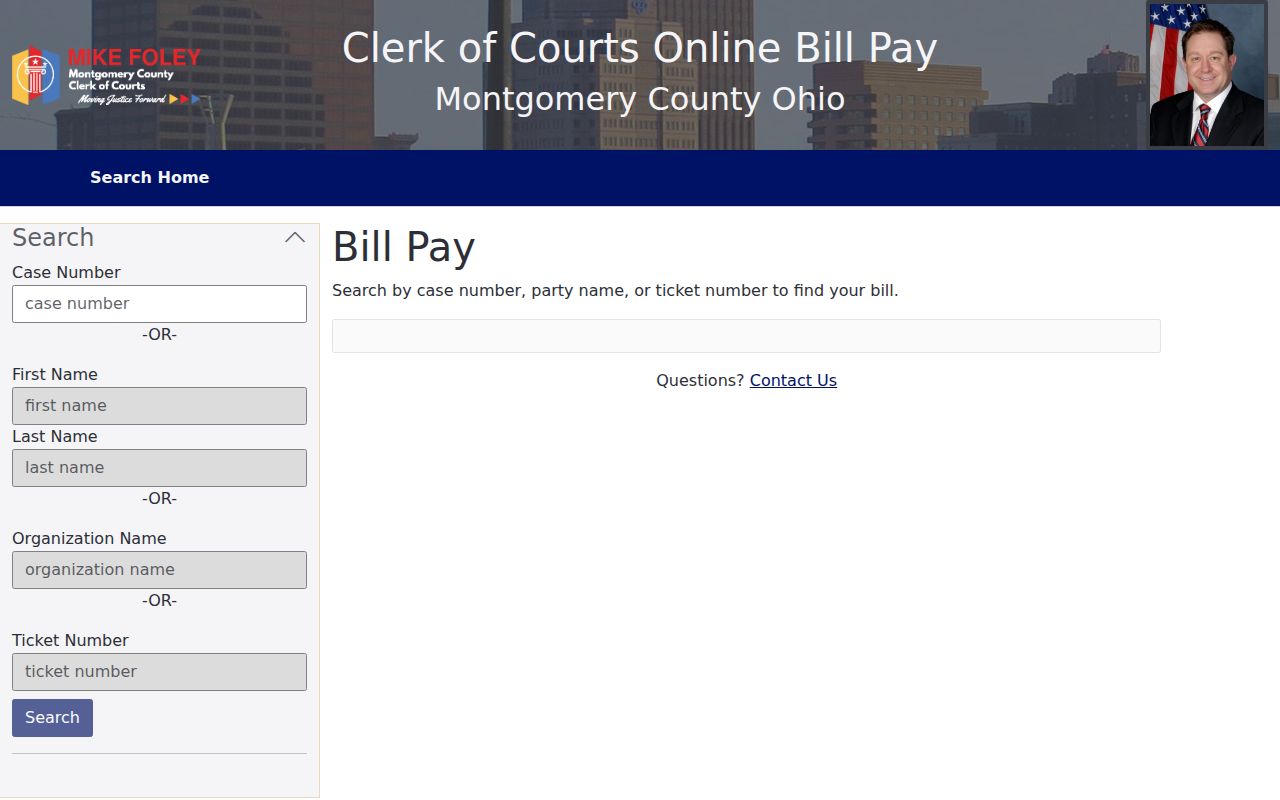
The bill-pay portal can answer whether an eligible balance can be paid, but the docket and court staff answer the separate question of what is scheduled or ordered.
Pay or Contest a Ticket
The citation and court instructions control whether payment is available and whether an appearance is mandatory. For a waiverable ticket, payment can operate as an admission and waiver. At Kettering, the court expressly says online payment is a guilty plea that waives contest and trial. A person considering that route should first read the citation and any court-specific options rather than assuming every traffic matter is payable online.
| Paying the Ticket | Contesting the Ticket |
|---|---|
| For an eligible waiverable item, payment may be an admission or guilty plea and waiver of contest. | Follow the issuing court's procedure to enter a not-guilty plea or otherwise respond and obtain the next setting. |
| Payment is due by the date required by the citation or court. Some cases cannot be paid online. | The response deadline and any mandatory appearance are controlled by the citation and court notice. |
| County Municipal eligible cases may offer online bill pay, mail, counter, or court-approved payment methods. | Use the court named on the citation; a clerk or counter can explain the published route when the portal does not apply. |
Missed court date or payment: R.C. 4510.22 permits court license forfeiture or suspension action in specified traffic situations after the statutory process when a person fails to appear or pay as required. Ohio BMV also explains that municipal or county court warrant reporting can create a license or registration-renewal block. Court release and BMV reinstatement are different actions, so the court named on the ticket and BMV are the respective official contacts.
The applicable statutory route is available in R.C. 4510.22.
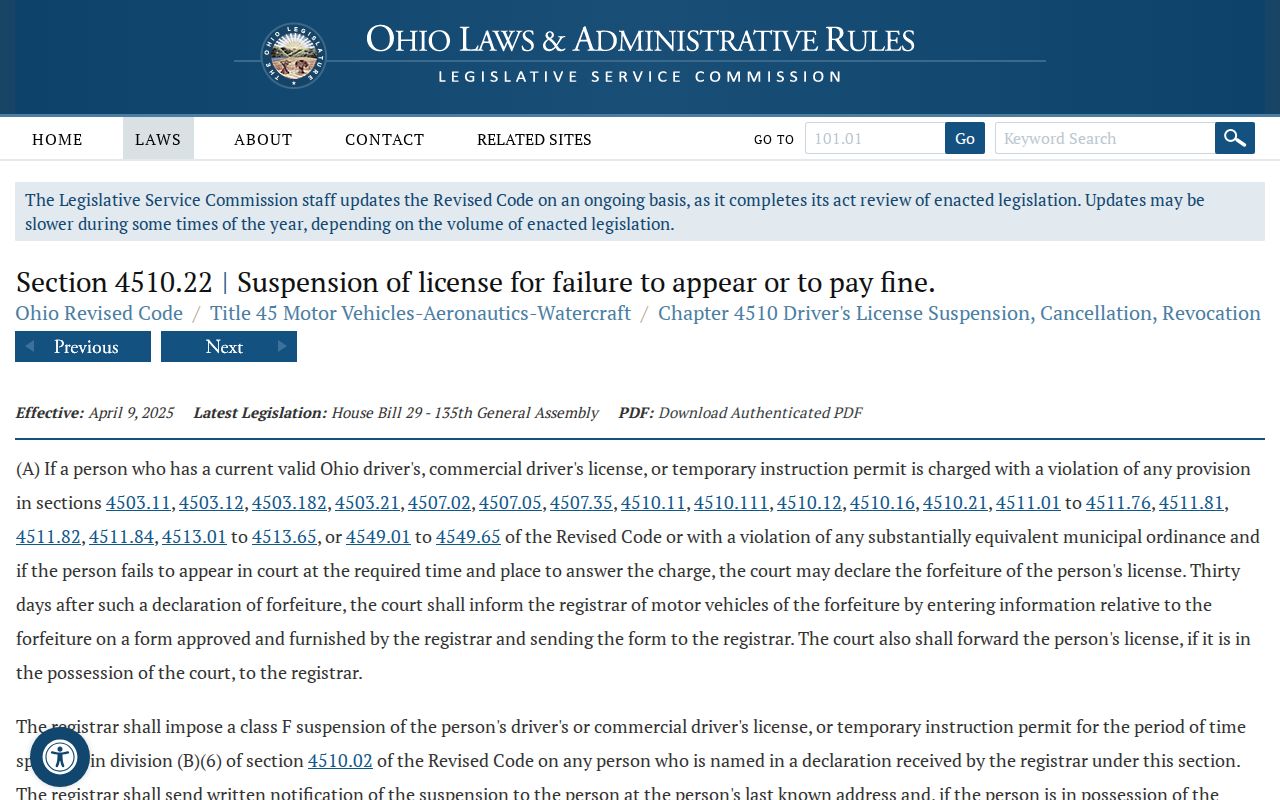
The statute describes a court-related process; it does not establish any result in an individual traffic court case.
Western Division Traffic Ticket Rules
Western Division publishes unusually specific traffic guidance for its territory. Its posted speeding fine bands are $150 for 1 to 10 mph over the limit, $160 for 11 to 15, $170 for 16 to 20, and $180 for 21 to 25; 26 mph or more requires an appearance. Its listed amounts are not a blanket price for every ticket. School or construction-zone matters, multiple violations, and unlisted items require clerk contact.
Western says an appearance is required for, among other circumstances, two previous citations within a year, more than one moving violation in the incident, a ticket marked must appear, 26 mph or more over the limit, 36 mph or more in a school zone, operating-license violations, or M1 through M4 offenses. It also publishes a $50 monthly payment-agreement rule, with missed agreements capable of making the full balance due and requiring further court action.
The official Western Division traffic guidance is the source for those local payment and appearance instructions.
For the separate city traffic search categories shown in this official source, see the Dayton Clerk traffic case-type page.
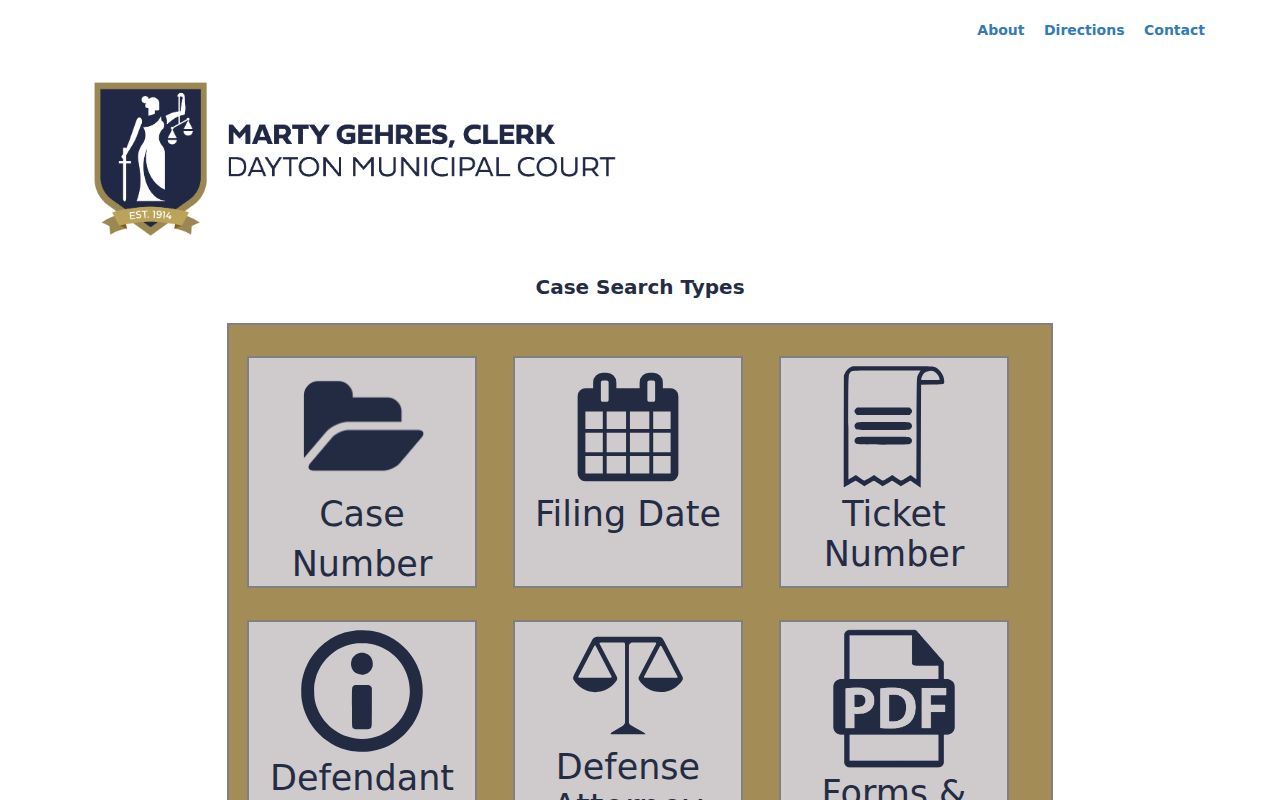
Court-specific search categories underscore why a traffic ticket must be routed to its issuing court rather than treated as a single countywide database entry.
Traffic Court Record vs Driving Record
A traffic court file and Ohio BMV driver record are two different records with two custodians. The court file is the record needed to find the citation, court date, docket entries, plea, order, payment, or court disposition. Ohio BMV keeps the separate licensing record. PRO, Court Connect, and the Dayton Clerk portals are court-record tools, not a BMV record-request channel.
| Court Traffic Record | Driver Record | |
|---|---|---|
| Kept By | The relevant municipal or county court and its clerk | Ohio Bureau of Motor Vehicles |
| Shows | Citation or charge, court date, docket entries, plea, order, payment, and court disposition | Licensing status and reported court actions under the BMV's own record process |
| How to Get It | The issuing court's official search, clerk, counter, or records-request channel | Contact Ohio BMV for its separate driver-record process |
The Ohio BMV's court-related license forfeiture guidance explains the administrative role separately from the court's underlying case record.
That BMV guidance belongs to the separate administrative record path and does not replace a traffic court docket or court record request.
Kettering and Dayton Traffic Ticket Routes
Dayton's Clerk hub has distinct traffic/criminal, parking, photo-enforcement, and docket paths. Its Traffic/Criminal selector supports Case Number, Filing Date, Ticket Number, Defendant, and Attorney routes, while its docket report uses courtroom, court date, session time, and sort order. Dayton says ordinary traffic tickets normally appear within five business days, so a just-issued ticket may need a short processing window or direct clerk confirmation.
Kettering's Court Connect is the separate public-record entry for Kettering and Centerville territory. The search is behind a CAPTCHA and acceptance screen, so its fields should not be guessed. Kettering says eligible online payment for non-appearance-required traffic or criminal citations carries a $4 processing fee and is a guilty plea. Its published Traffic Safety Program has separate eligibility and timing conditions, so payment should not be selected before those court-specific options are checked.
For Probate's separate fee chart, consult the Probate Court fee page.
The Probate source illustrates the broader county rule: each court has its own custodian and fee route, even though traffic tickets do not belong in the Probate system.
Copies and Fees
For a traffic case record, direct the copy request to the issuing court or its clerk. County Municipal Eastern and Western requests can be made in person, by telephone, fax, or mail at the appropriate division. For Clerk-held court records, regular copies cost $0.10 per page, certified copies cost $1.00 per page, and an authenticated, exemplified, or triple-sealed copy has a published $5.00 charge. A traffic fine is case-specific and is not the same as a copy fee.
| Item | Fee | Notes |
|---|---|---|
| Regular Clerk copy | $0.10 per page | Use the court or Clerk that holds the traffic case. |
| Certified copy | $1.00 per page | Deputy-clerk certification; PRO cannot certify authenticity. |
| Authenticated, exemplified, or triple-sealed copy | $5.00 | Request only when the receiving party specifically requires it. |
| Online PRO docket view | No posted online viewing fee | County Municipal access only; it is not a certified record. |
Montgomery Traffic Ticket Docket Entries
After locating a traffic case, read its chronological docket rather than relying on a balance screen or the original citation alone. The useful record sequence can include filing or ticket entry, notice of appearance, a hearing, a plea, an order, payment information, a continuance, and a recorded disposition. A later court entry can change what an earlier date or notice meant, so the newest entry and court confirmation control.
For County Municipal cases, PRO describes its docket entries as exact entries from the official court docket. Documents can still be redacted, delayed, restricted, or unavailable online. For Dayton and Kettering, use the corresponding court docket or Clerk record path. That division-by-division approach follows the actual custodians instead of treating payment information as the complete court record.